A local AI video editor for short clips, on your Mac
Reelify is where a long video becomes a stack of finished short clips, without the footage ever leaving your Mac. The AI picks the moments. You review them, trim them, caption them, reframe them to vertical, and export, all in one window. It is built for the clipping job, not to replace your full editor.
Free forever. No watermark, no credit card. For Apple Silicon Macs.
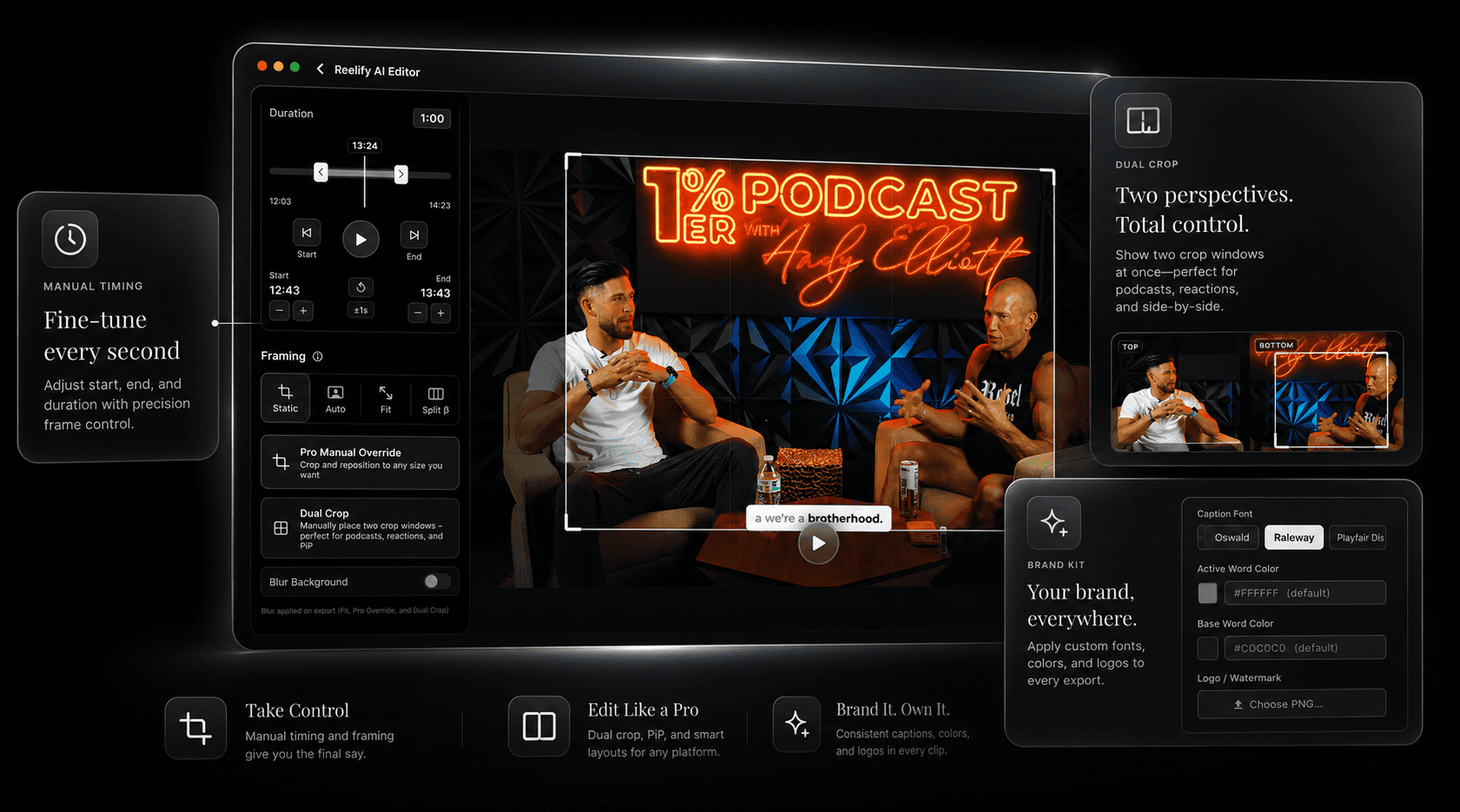
What you can do in the editor
The AI gives you a shortlist. The editor is where you make each clip yours.
-
Review the suggestions
Each suggested clip has a time range, a title, and a note on the hook. Play it, keep it, or drop it. Regenerate for a different angle if you want more options.
-
Trim to the exact beat
Move the start and end until the clip opens on the line you want and ends on the laugh. A two-second nudge is often the difference between a clip that works and one that doesn't.
-
Caption it your way
Pick the font, the color of the active word, and the color of the rest. Save your logo and caption style as a brand kit, and every clip comes out looking like one channel.
-
Reframe for vertical
Clips go to 9:16 with the speaker kept in frame. Dual crop puts two speakers, or gameplay and a facecam, in one vertical layout.
-
Export the batch
Export one clip or a dozen, ready for TikTok, Instagram Reels, and YouTube Shorts.
Why the editing happens on your Mac
We run a small content studio, and the question that changed how we work came from a client's legal team: "Where does our footage go when you use this AI tool?" The honest answer at the time was "to the tool's servers, under terms that let them improve their models." We nearly lost the account.
That was the push to build an editor that keeps the file where it started. Now the answer is a sentence we can say with a straight face: the video is processed on our Mac. Along the way it also removed the upload wait, the queue, and the meter, which is why it's just faster to work in.
- Source footage
- Stays on your Mac while you review, edit, and export
- Waiting
- No upload and no queue. A long recording is usually ready to review in a couple of minutes on a recent Mac.
- Internet
- Not needed for editing
- Metering
- No credits or per-minute billing on any plan
The optional Cloud AI feature sends only the transcript text, never the video. See the privacy policy. For the full picture of how on-device clipping works, read the local AI video clipper page.
Local editing compared with a browser editor
| Browser or cloud editor | Reelify on Mac | |
|---|---|---|
| Getting started | Upload the source, then wait | Open the file from your drive |
| Where your footage sits | On the provider's servers | On your Mac |
| No connection | Stops working | Keeps working |
| Cost model | Minutes or credits, often monthly | Free forever, no credits on any plan |
| Shared review links | Often included | Not included. You send the exported files. |
| Full timeline editing | Varies | Not the goal. Use your NLE for that. |
The whole loop in 18 seconds
A long video goes in, the clips screen lists the suggested moments, and a captioned clip comes out. The demo has no audio.
Who this editor suits
A good fit
- Agencies and freelancers whose clients ask where footage goes
- Podcasters and interviewers cutting weekly clips
- Teams whose security rules keep internal video off third-party servers
- Anyone who works on planes, in cabins, or on shaky Wi-Fi
Not a fit
- You need a multi-track timeline, effects, or color grading
- You need team comments and approval links inside the tool
- Your footage has little speech, such as music or B-roll
- You are on Windows or an Intel Mac. See the Windows waitlist.
Frequently asked questions
Is Reelify a full video editor?
No. It is a clipper and short-form editor. It handles finding moments, trimming, captions, vertical reframing, and export. For multi-track timelines and effects, keep using your usual editor and bring the exported clips in.
Does the editing happen offline?
Yes. Reviewing, trimming, captioning, reframing, and exporting all run on your Mac without an internet connection. Only the optional Cloud AI feature needs one.
Can I style captions to match my brand?
Yes. Choose the font and the colors of the active and base words, and save a logo and caption style as a brand kit to reuse across clips.
Is my footage uploaded while I edit?
No. The video file stays on your Mac. According to the privacy policy, the optional Cloud AI feature sends only the text transcript, never the video.
Which Macs does it run on?
Any Mac with Apple Silicon (M1 or newer) on macOS 15 or later. Intel Macs are not supported.
How much does it cost?
Reelify for Mac is free forever, with AI clipping on every video, 1080p exports with no watermark, and no credit card. Creator is $59 once with no subscription, or Starter is $15 a month, and both add unlimited exports from every video, all caption styles, and the full editing suite. There is also a free iPhone and iPad app with no video limit, where you pick the moments yourself.
Edit your next batch of clips at home
Open a long recording, let the AI shortlist the moments, and finish the clips yourself, with nothing sent anywhere.
Rated 4.9★ on the App Store.