Stop Paying Per Minute — Reelify is free to use for Mac
Sick of running out of credits mid-project? Reelify for Mac gives you Free to start AI clipping. No credits, no overages, no bullshit. Upgrade to $59 Lifetime or $15/mo Pro for advanced hooks.
Requires macOS (Apple Silicon M1+)
How Reelify Gives You Superpowers
AI Finds the Viral Hooks
Our AI watches your entire video and automatically detects the moments that make people stop scrolling: emotional peaks, laugh-out-loud moments, powerful statements, and narrative hooks.

Smart Speaker Tracking
Active Speaker Detection keeps your subject perfectly framed. Forget complex keyframes—Reelify instantly turns horizontal footage into 9:16 vertical masterpieces.
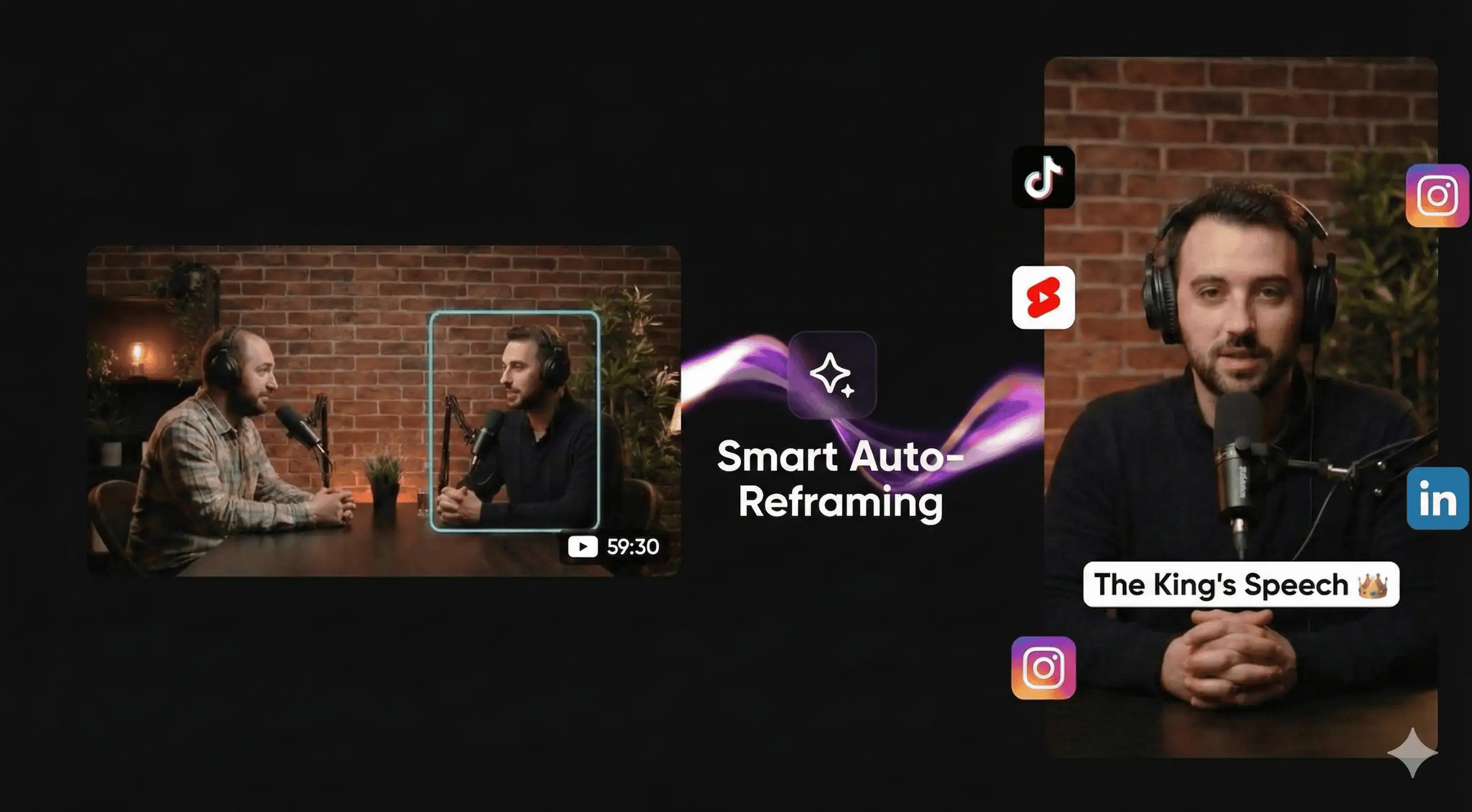
Stop Editing Text Manually
Beautifully styled captions, generated automatically. Accurate transcription with customizable fonts, colors, and animations—essential for viral clips.

The Cost of "Free" Credits
Why agencies and power users are switching to Reelify
The Math: If you process 10 hours of video a month:
OpusClip cost: $100+ vs Reelify cost: $0 (Free to start).
Trusted by Agencies & Editors
"We process 20+ podcasts a week. OpusClip's credit limits were killing our margins. Reelify's unlimited flat rate saved us about $400/mo immediately."
"The local processing is a game changer. No more waiting 20 minutes for an upload just to fail. It's instant on my M2 Mac."
"Finally an unlimited option. I don't have to count minutes or worry about 'wasting' credits on bad source footage."
Why Creators Are Switching from Opus Clip
The real problems with Opus Clip that waste your time and money
If your main concern is privacy or storage, see the Opus Clip safety and storage page for a focused breakdown of uploads, retention questions, and local alternatives.
Opus Clip Problems
Reelify AI Solution
5 Reasons Creators Choose Reelify AI Over Opus Clip
Unlimited for $15/mo Pro vs Per-Minute Credits
Opus Clip charges per minute. Reelify AI gives you unlimited processing for $15/mo Pro flat. That's clipping time to grow your content without paying.
90 Seconds vs 20 Minutes
No more uploading huge video files. Reelify AI processes locally on your device in about 90 seconds. Opus Clip takes 10-20+ minutes just to upload.
Clean Exports vs Branded
Opus Clip slaps prominent watermarks on free exports. Reelify AI keeps branding minimal and subtle—your content stays the focus.
100% Private vs Cloud Upload
Your videos never leave your device with Reelify AI. Opus Clip requires uploading your content to their cloud servers. Privacy matters.
Native Mac App vs Web Only
Reelify AI has a native Mac app optimized for Apple Silicon (M1+). Opus Clip is web-only. Native app = faster, smoother, better experience.
If you want a Mac-focused comparison, the Opus Clip alternative for Mac page breaks down the native workflow and local processing details.
Switch from Opus Clip in 3 Steps
Start creating better clips in under 2 minutes
1
Download Free
Get Reelify AI for Mac. No account, no credit card, no friction.
2
Drop Your Video
Pick any video. Watch Reelify AI find 10 viral clips in 90 seconds flat.
3
Cancel Opus Clip
Once you see the difference, cancel Opus Clip and keep the $19+/mo savings.
Frequently Asked Questions
Everything you need to know about switching from Opus Clip
Reelify AI is the best Opus Clip alternative in 2026. Reelify AI for Mac offers unlimited AI clipping for $15/mo Pro flat (no credits), processes videos locally in 90 seconds (vs 10-20 minutes), exports without watermarks, and keeps your videos 100% private on your device. Free trial included, no card required.
Reelify AI for Mac costs $15/mo Pro flat for unlimited video processing. No credits, no per-minute charges. Free trial included with no card required. Opus Clip uses per-minute credits that get expensive for power users who process a lot of content.
Yes, Reelify AI is significantly faster. Reelify AI processes videos locally in about 90 seconds. Opus Clip requires uploading videos to cloud servers, which takes 10-20+ minutes for large files, plus additional processing queue time. No upload = no wait.
Reelify AI has minimal, barely visible branding on free exports—nothing like Opus Clip's large, distracting watermarks. Your content stays the focus. Upgrade to remove all branding completely.
Yes, Reelify AI keeps your videos 100% private. Videos never leave your device—only lightweight text data is sent for AI analysis. Opus Clip requires uploading your entire video to cloud servers for processing. If you work with confidential content, Reelify AI is the only safe choice.
Switch because Reelify AI offers: unlimited processing for $15/mo Pro flat (no credits), 90-second processing vs 20+ minute uploads, no watermarks, 100% privacy vs cloud uploads, and a native Mac app optimized for Apple Silicon. It's better in every way that matters.
Ready to Go Unlimited?
Stop counting minutes. Start creating unlimited clips today with Reelify for Mac.
Secure checkout. Cancel anytime.