Reelify for Mac Long video in, clips out
Drop in a podcast, interview, webinar, or stream of any length. Reelify's AI reads it on your Mac and hands back a ranked list of clips, each with a title and a note on the hook. You tighten them, add captions, reframe to 9:16, and export. Nothing is uploaded, nothing is metered, and there are no credits to run out of.
Free forever. No watermark, no credit card. For Apple Silicon Macs.
Your Mac already has the hardware for this
Every Apple Silicon Mac, from the first M1 onward, has a Neural Engine built for exactly this kind of work. Reelify is built around it. The AI runs on your chip, against a file on your drive, so there is no upload bar, no processing queue, and no server bill to pass on to you.
That is why the pricing looks different from cloud clippers. We do not pay for your video to be processed, so we do not meter it. Clip one episode or a hundred, and the cost to you is the same. It also means your footage stays put. The video file never leaves your Mac, which matters for client work, paid courses, and anything unreleased.
How a session goes
-
Drop in the recording
Drag a file in from Finder. There is no length limit, so a two-hour podcast or a six-hour stream is one file.
-
Read the shortlist
In our own tests, a 52-minute webinar on an M2 MacBook Pro surfaced 12 to 15 clip candidates in about 100 to 130 seconds. Results vary by footage and chip. Each suggestion has a time range, a title, and a note on the hook.
-
Tighten and style
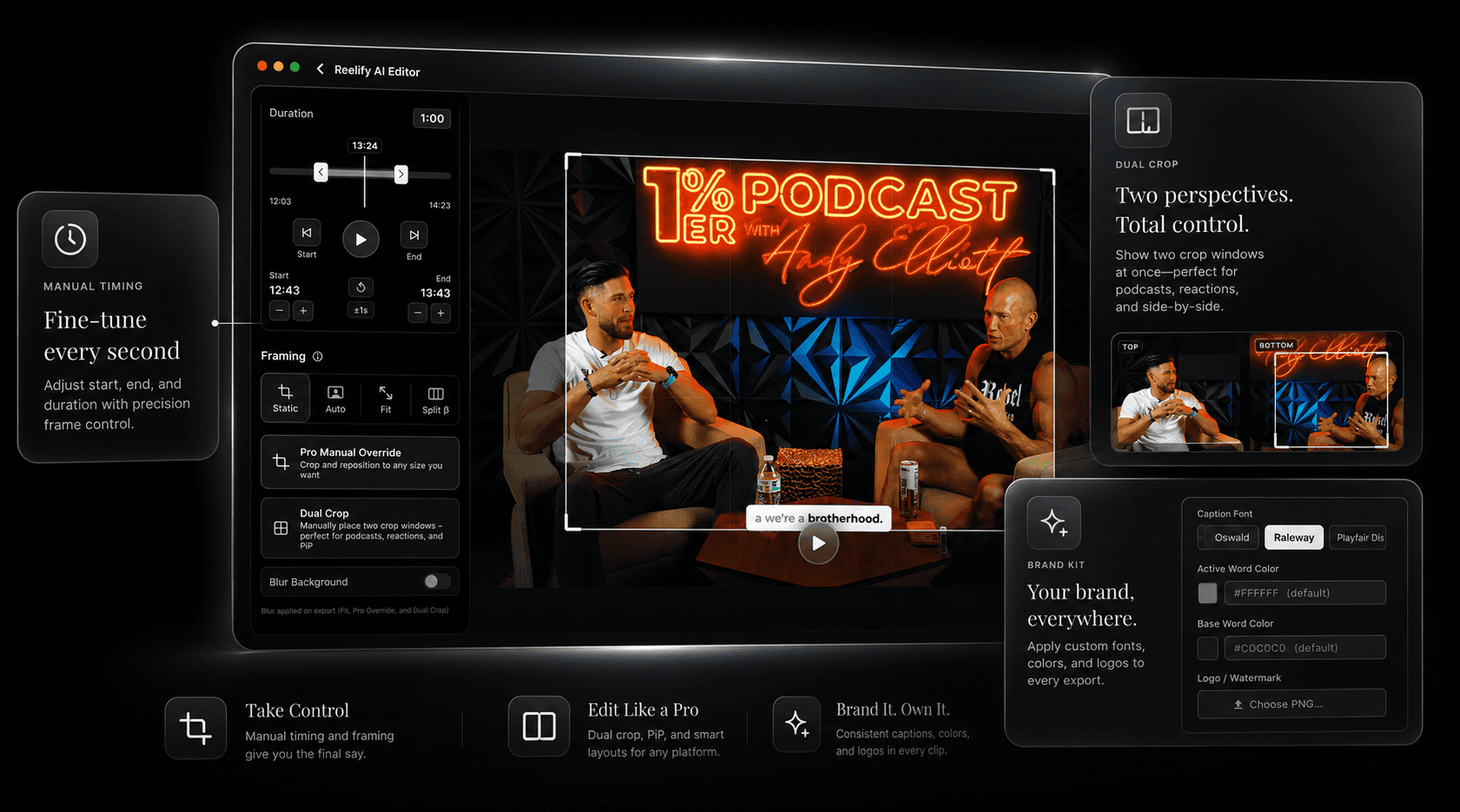
Move the start and end, pick the framing, and apply your caption font and colors. Save your logo and caption style as a brand kit and reuse it on every clip.
-
Export and post
Export vertical 9:16 clips with captions for TikTok, Instagram Reels, and YouTube Shorts. They are standard video files, so they also drop into any Mac editor if you want to polish further.
What is in the app
- Clip suggestions
- A ranked list from the whole video, each with a time range, a title, and a hook note. Regenerate for a different angle if you want more options.
- Editing
- Adjust the start and end of every clip before you export
- Captions
- Word-level captions with your choice of font and colors, plus a saved brand kit
- Framing
- Vertical 9:16 reframing, with dual crop to put two speakers, or gameplay and a facecam, in one frame
- Length
- No limit. Long recordings import as one file.
- Languages
- AI clipping in 20+ languages, including Chinese, Japanese, and Korean. English is the strongest.
- Privacy
- The video file is processed on your Mac and not uploaded
- Offline
- Works without an internet connection
Reelify is a clipper, not a full timeline editor. It works best on footage with clear speech.
Simple pricing, no meter
Free forever, so you can run real footage through it. Paid plans add more when clipping becomes a habit. No plan uses credits or per-minute billing.
| Plan | Price | What you get |
|---|---|---|
| Free | $0, free forever | Free forever: unlimited video imports, AI clipping on every video, 1080p exports with no watermark, no credit card, no time limit. |
| Creator | $59 once | Everything in Free, plus unlimited exports from every video, all caption styles, hook detection and generated titles, and the full editing suite. No subscription. |
| Starter | $15 a month | Everything in Creator, billed monthly for people who prefer it |
Is Reelify for your Mac?
A good fit
- You have an Apple Silicon Mac: M1, M2, M3, M4, or newer, on macOS 15 or later
- You clip podcasts, interviews, webinars, lessons, or streams
- You are tired of credits, caps, and upload waits
- The footage is private, paid, or client-owned
Not a fit
- You have an Intel Mac. Reelify needs Apple Silicon.
- You want a full multi-track timeline editor
- Your footage has little speech, such as music or B-roll
- You are on Windows. See the Windows waitlist.
No Mac handy? Reelify for iPhone and iPad is a free companion app where you pick the moments from a transcript, with no limit on videos.
Mac questions
Which Macs does Reelify support?
Any Mac with Apple Silicon (M1 or newer) running macOS 15 or later: MacBook Air, MacBook Pro, iMac, Mac mini, Mac Studio, and Mac Pro. Intel Macs are not supported. For a chip-by-chip breakdown, see the Apple Silicon AI video clipper page.
How fast is local processing compared with cloud clippers?
There is no upload and no queue. In our tests on an M2 MacBook Pro, a 52-minute webinar produced 12 to 15 clip candidates in about 100 to 130 seconds. Speed depends on your chip and your footage.
Is there a limit on video length?
No. Long recordings import as one file, including streams of 6 hours or more.
Does Reelify work with Final Cut Pro and other Mac editors?
Reelify exports standard video files, so clips open in any Mac editor. Direct Final Cut Pro integration is planned but not available yet.
Are my videos uploaded?
No. The video file is processed on your Mac. According to the privacy policy, the optional Cloud AI feature sends only the text transcript, never the video.
How much storage does Reelify need?
The app is about 2GB. While processing, keep free space of about 2 to 3 times the size of your video, so a 1GB video wants roughly 3GB free.
Put your longest recording through it
Pick the file you have been meaning to clip for weeks. Drop it in, and see what the AI finds while you make coffee.
Apple Silicon Mac, macOS 15 or later. Rated 4.9★ on the App Store.