An AI video editor for macOS Built for the clips, not the timeline
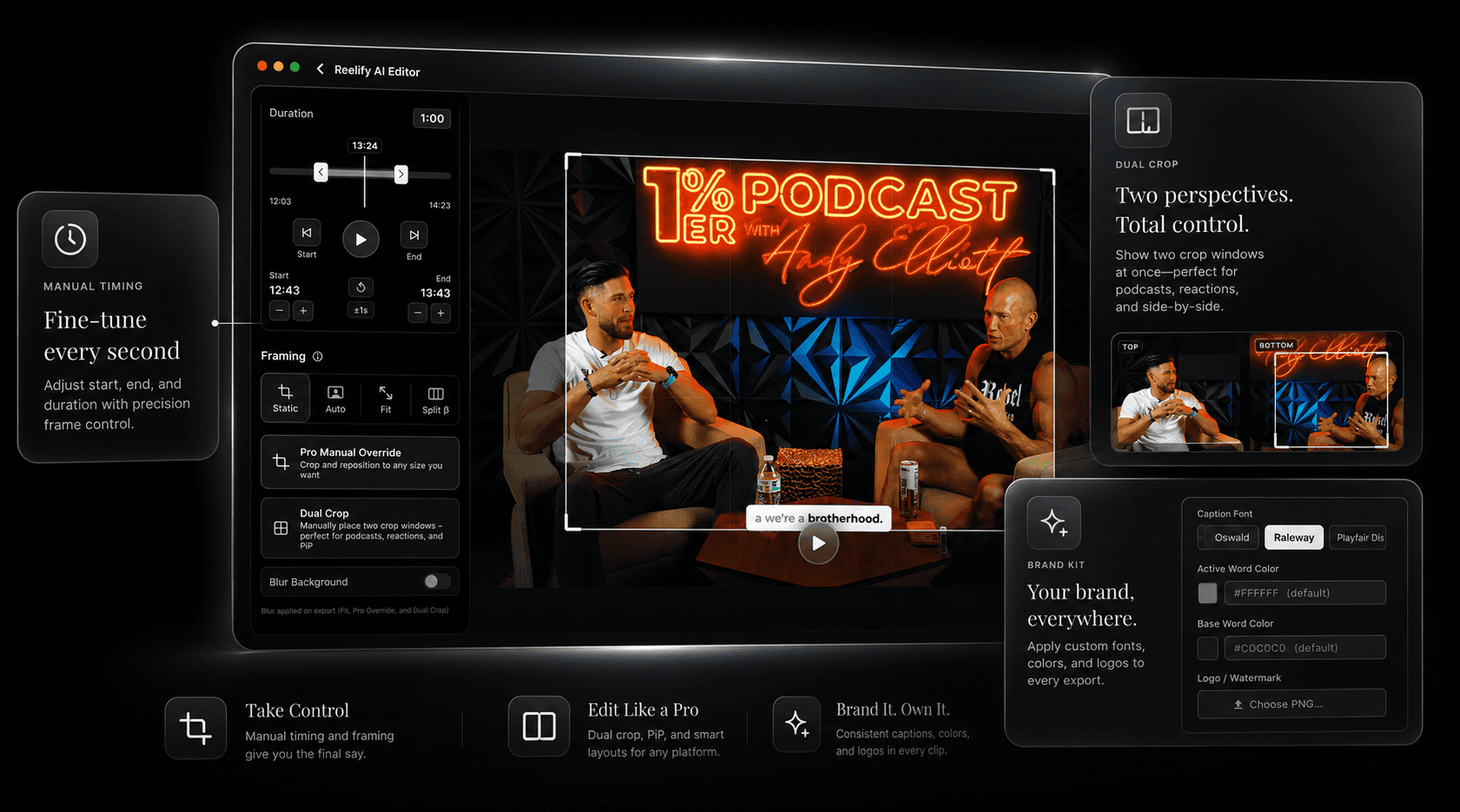
Reelify is the AI editor you reach for when you have a long recording and need short clips out of it. It reads the whole video on your Mac, suggests the best moments, and lets you trim, caption, and reframe each one to vertical. It is laser-focused on short-form clips, so it skips the timeline editor complexity and lets you It does the slow part of short-form work so your editing time goes where it counts.
Free forever. No watermark, no credit card. For Apple Silicon Macs.
What kind of AI video editor is this?
"AI video editor" covers a lot of ground, from tools that generate video from a prompt to full timeline editors with a few AI features. Reelify sits in one specific spot: it takes footage you already have and finds the parts worth posting.
-
It finds the moments
Drop in a podcast, interview, lecture, or stream. Reelify suggests clips, each with a time range, a title, and a note on the hook.
-
It finishes them
Trim the start and end, caption with your font and colors, and reframe to 9:16. Dual crop puts two speakers, or gameplay and a facecam, in one vertical frame.
-
It exports standard files
Clips are regular video files, so they open in any Mac editor if you want to go further.
Where it fits next to your other Mac editing apps
Most Mac creators already have an editor. Reelify doesn't replace it. It handles a different job.
| The job | Use Reelify | Use a timeline editor |
|---|---|---|
| Find the best moments in a long recording | Yes, this is what it is for | Possible, but you scrub through it by hand |
| Captioned vertical clips for TikTok, Reels, Shorts | Yes | Possible, with manual captioning and reframing |
| Multi-track editing, effects, color grading | No | Yes, in Final Cut Pro, Premiere, DaVinci Resolve, and similar |
| B-roll, music, and motion graphics | No | Yes |
| Working with footage you can't upload | Yes, the video stays on your Mac | Yes, local by nature |
A common pattern: let Reelify shortlist and cut the clips, then open the few that need extra polish in your editor of choice. Direct Final Cut Pro integration is planned but isn't available yet, so for now you move the exported files across yourself.
What it needs on a Mac
- Chip
- Apple Silicon: M1, M2, M3, M4, or newer. Intel Macs are not supported.
- macOS
- macOS 15 or later
- Memory
- 8 GB of RAM minimum, 16 GB recommended
- Import
- Drag a file in from Finder. No account needed to start.
- Internet
- Not needed for clipping, captioning, or export
- Video length
- No limit. Long recordings import as one file.
The AI runs on the Apple Silicon chip, which is why Intel Macs can't run it. More in the Apple Silicon AI video clipper guide.
Who it suits on Mac
A good fit
- Podcasters: turn a full episode into a batch of clips
- Course creators and coaches: pull teaching moments and promo clips from lessons and calls
- Streamers and YouTubers: cut VODs and long videos into Shorts
- Agencies and freelancers: deliver clips without uploading client footage
Not a fit
- You need a full timeline editor, effects, or color grading
- You have an Intel Mac. Reelify needs Apple Silicon.
- Your footage has little speech, such as music or B-roll
- You are on Windows. See the Windows waitlist.
Frequently asked questions
Is there an AI video editor for Mac that runs on-device?
Yes. Reelify is a Mac app whose AI runs on your Apple Silicon chip, so the video is processed on your Mac and not uploaded. It focuses on turning long videos into short, captioned, vertical clips.
Is Reelify a full video editor like Final Cut Pro?
No. It is a clipper and short-form editor. It doesn't have a multi-track timeline, effects, or color grading. Use it to find and cut the clips, and your usual editor for anything beyond that.
Does Reelify work on Intel Macs?
No. It needs an Apple Silicon Mac (M1 or newer) running macOS 15 or later.
Does it work with Final Cut Pro?
Reelify exports standard video files that open in Final Cut Pro and other Mac editors. Direct Final Cut Pro integration is planned but not available yet.
Is the AI video editor free?
Yes. Reelify for Mac is free forever, with unlimited video imports, AI clipping on every video, 1080p exports with no watermark, and no credit card. Creator is $59 once with no subscription and adds unlimited exports from every video, all caption styles, and the full editing suite. A free iPhone and iPad app with no video limit is also available.
Does it work without an internet connection?
Yes. Clipping, captioning, reframing, and export all work offline. Only the optional Cloud AI feature needs a connection.
Let the AI do the shortlisting
Drop a long recording into Reelify and see which moments it picks, before you open your editor.
Rated 4.9★ on the App Store.